First Entity
The concept of creating entities is somewhat different from everything else, a script will not work for this, it is much more convenient to use behavior and resource packs. This article describes many new concepts not described previously, however we will get acquainted with most of them. Let's start with the foundation of a new mob, and later move on to describing its behavior and creating the visual part.
Defining the entity
Any entity begins with the creation of a server-side definition that determines common attributes (modifiable variables set by default), attribute groups, and events. First of all, create a behavior pack if you haven't already. Information in packs is in most cases determined by JSON files, you can compare them with objects in our main language.
Determine what the entity will be called by coming up with an identifier for it. This identifier will be used for spawning the entity, commands with it, and for many other purposes. Like any other unique identifier in packs, it must start with your project's namespace. Now create an entities folder, it must contain descriptions of any mobs that you create or plan to create.
Assuming we are creating a Keeper entity in the My Mod mod, the structure will look like this:
{
    "format_version": "1.10.0",
    "minecraft:entity": {
        "description": {
            "identifier": "mymod:keeper"
        }
    }
}
Created a file with this content? Then, let's complete it! The next and final step in specifying the main definition object will be determining the ability to place the entity in the world. Several parameters are responsible for this, add them to your description object:
{
    "format_version": "1.10.0",
    "minecraft:entity": {
        "description": {
            ...
            // whether to add a spawn egg for the entity
            "is_spawnable": true,
            // whether the entity can be summoned by a command or
            // any mod using regions
            "is_summonable": true
        }
    }
}
Do not forget to separate the previous property with a comma, simply missing one of the syntax signs will make the object unreadable. In principle, the entity is already created, we just need to add its description elements and add the visual part for rendering in the world.
Let's move on to creating entity properties, no mob is complete without them. Let's start with determining the health, size, and categories to which the entity belongs:
{
    ...
    "minecraft:entity": {
        ...
        "components": {
            // assigning the entity to a category (family), subsequently
            // other mobs will be able to determine what entity is in
            // front of them, using family groups instead of identifiers
            "minecraft:type_family": {
                // actually the families themselves, by which the entity is
                // identified; for example, the villager family is
                // attacked by zombies, and the mob property must be
                // applied to all entities except, for example, arrows
                "family": [ "keeper", "villager", "mob" ]
            },
            // practically any object with just a couple of properties is
            // an attribute of an entity, which you can modify directly
            // from the engine using Entity.get/setAttribute
            "minecraft:health": {
                // the amount of life is defined in half-hearts
                "value": 20, // the value the mob will spawn with
                "max": 20 // the maximum possible respectively
            },
            // within the boundaries of this shape physics, a hitbox appears,
            // inside which you can deal damage to the entity and
            // interact with it
            "minecraft:collision_box": {
                "width": 0.6, // width + depth
                "height": 1.9 // height
            },
            // the entity will not disappear after the chunk is unloaded, usually
            // "non-persistent" entities are monsters
            "minecraft:persistent": {}
        }
    }
}
Great, the main properties are there, but our entity remains without physics. It just hangs in the air, oblivious to physics. Let's add a few more properties using this same object:
{
    ...
    "minecraft:entity": {
        ...
        "components": {
            ...
            // if the entity has no physics, its velocity is constant,
            // meaning it moves linearly and with constant acceleration;
            // observe how a fireball flies, it has no physics
            "minecraft:physics": {},
            // just like the player (who, by the way, is also an entity),
            // other mobs have their own oxygen supply
            // and the ability to stop its supply (which will start
            // reducing health due to suffocation)
            "minecraft:breathable": {
                // time in seconds before the entity starts suffocating
                // while in liquids (under water or lava)
                "total_supply": 15,
                // time in seconds before the entity starts suffocating
                // while in blocks (for example, if gravel falls)
                "suffocate_time": 0
            },
            // by default the entity cannot be pushed, it does not have
            // contact collision with objects
            "minecraft:pushable": {
                // whether other entities can push the mob
                "is_pushable": true,
                // whether a piston can push the mob
                "is_pushable_by_piston": true
            }
        }
    }
}
And importantly, let's add receiving damage; in fact, no liquid can deal damage until the property is defined in the description object. This is receiving damage from being in lava:
{
    ...
    "minecraft:entity": {
        ...
        "components": {
            ...
            "minecraft:hurt_on_condition": {
                "damage_conditions": [
                    {
                        "filters": {
                            // here are some simple conditions
                            // both for the mob itself and its environment
                            "test": "in_lava",
                            // from whom the property should be obtained
                            "subject": "self",
                            // if the condition is met, then the filter worked
                            "value": true
                        },
                        // the cause of the damage, for example suffocation or falling
                        "cause": "lava",
                        // amount of damage per tick (1/20 of a second)
                        "damage_per_tick": 4
                    }
                ]
            }
        }
    }
}
Before adding behavior, let's create the entity on the client side too. This will help determine what the entity should do and how the player can interact with it.
Visual component
The server side is created in behavior packs, while the client side (or visual) uses resource packs. Also create a new pack if necessary, and we will start with the description object of the future mob. Place it in the entity folder using the format *.entity.json:
{
    "format_version": "1.10.0",
    "minecraft:client_entity": {
        "description": {
            // the same identifier as in the server
            "identifier": "mymod:keeper",
            // materials define rendering rules for
            // textures, transparency and blend modes
            "materials": {
                "default": "entity_alphatest"
            },
            // several textures usually need to be described
            // for multiple variations, we'll make do with one
            "textures": {
                "default": "textures/entity/keeper"
            },
            // we will use the standard vindicator model,
            // it is practically identical to a villager, but also
            // has arms outside a crossed appearance
            "geometry": {
                "default": "geometry.vindicator.v1.8"
            },
            // it is not necessary to describe a spawn egg,
            // or you can specify the path to a created texture
            "spawn_egg": {
                "base_color": "#3a3a3a", // base color
                "overlay_color": "#b89535" // spot colors
            }
        }
    }
}
But while most of the data only describes the future properties of the mob, let's determine what is needed to display any entity in the game world. The principles apply to every mob without exception.
- Texture or multiple layers of textures (for example, for villagers, their profession determines which texture will be overlaid on the base layer).
- Shape (model, or geometry), as well as its controllers to create animations, display conditions for parts of the model, and so on.
- Description object to link the shape, textures (using materials), shapes, and their controllers.
There is nothing complicated here, let's understand each point in more detail.
Texture and materials
A large role in the visualization of the whole entity is taken by the texture. For entities, they are located in the textures/entities folder of your resource pack, usually using the mob's identifier. For example, download a ready-made Keeper texture by placing it at the path textures/entities/keeper.png:

In most cases, one texture will be enough, it can be created using various model editors or simple image editors (just make sure you have the ability to create images with transparent pixels and save them in the .png format).
Geometry and controllers
Let's use the already created models, but complicate their logic by adding extra controllers. Controllers describe the behavior of a regular static model by adding conditions for drawing bones, and linking it with materials and textures. In fact, the controller links the properties passed in the client description with the mob itself.
Let's start with the model (render) controller, we need to hide the crossed arms if the entity has a target and show a pair of regular ones:
{
    "format_version": "1.10.0",
    "render_controllers": {
        "controller.render.mymod.keeper": {
            // property names from the client entity
            // description object are used here
            "geometry": "Geometry.default",
            "part_visibility": [
                // arms (and the item in them) should only
                // be displayed if the entity has a target to attack
                { "rightArm": "query.has_target" },
                { "leftArm": "query.has_target" },
                { "rightItem": "query.has_target" },
                // but if there is no target, we can display the regular
                // crossed arms like villagers
                { "arms": "!query.has_target" }
            ],
            "materials": [
                { "*": "Material.default" }
            ],
            "textures": [
                "Texture.default"
            ]
        }
    }
}
Suppose the entity is capable of finding a bed and sleeping at night (again, like villagers). For this, it is convenient to use states by employing animation controllers. They allow you to create a transition between them based on the current state, defining possible animations and conditions for the next transition.
{
    "format_version": "1.10.0",
    "animation_controllers": {
        "controller.animation.mymod.keeper": {
            // default animation controller state
            "initial_state": "default",
            "states": {
                // the standard state allows the mob to move,
                // attack, and simply stand in place
                "default": {
                    "animations": [
                        "keeper",
                        "keeper_attack",
                        "keeper_walk"
                    ],
                    "transitions": [
                        { "get_in_bed": "query.is_sleeping" }
                    ]
                },
                // transition to the sleeping state, the mob simply
                // does not need other animations here at this moment
                "get_in_bed": {
                    "animations": [
                        "get_in_bed"
                    ],
                    "transitions": [
                        { "default": "!query.is_sleeping" }
                    ]
                }
            }
        }
    }
}
Client Entity
Using the controllers we just reviewed, let's link them to the mob by adding animations and the controllers themselves to it. To do this, let's complete the definition object created earlier by adding controllers and animations for them.
{
    "format_version": "1.10.0",
    "minecraft:client_entity": {
        "description": {
            ...
            // any property names in the animation list are used by controllers
            "animations": {
                // animations used by our newly created controller
                "keeper": "animation.vindicator.base",
                "keeper_attack": "animation.vindicator.attack",
                "keeper_walk": "animation.vindicator.walk",
                "get_in_bed": "animation.villager.get_in_bed",
                "controller_keeper": "controller.animation.mymod.keeper",
                // the mob looks at the target when necessary (for example, when
                // looking at the player or the entity it is currently attacking)
                "look_at_target_default": "animation.humanoid.look_at_target.default",
                "look_at_target_gliding": "animation.humanoid.look_at_target.gliding",
                "look_at_target_swimming": "animation.humanoid.look_at_target.swimming",
                "controller_look_at_target": "controller.animation.humanoid.look_at_target",
                // the villager raises their arms when you show them an item
                // that can be used for trading with them
                "raise_arms": "animation.villager.raise_arms",
                "controller_raise_arms": "controller.animation.villager_v2.raise_arms",
                // a bowstring needs to be drawn, and there are many other
                // items in the game that an entity can use
                "bow_and_arrow": "animation.humanoid.bow_and_arrow",
                "controller_bow_and_arrow": "controller.animation.humanoid.bow_and_arrow",
                "use_item_progress": "animation.humanoid.use_item_progress",
                "controller_use_item_progress": "controller.animation.humanoid.use_item_progress"
            },
            "scripts": {
                // the scale of an entity is determined for some of them, this
                // is the standard value for villagers and pillagers
                "scale": "0.9375",
                // animation controllers listed in the previous property
                "animate": [
                    "controller_keeper",
                    "controller_look_at_target",
                    "controller_raise_arms",
                    "controller_bow_and_arrow",
                    "controller_use_item_progress"
                ]
            },
            // render controllers for linking models and their states
            "render_controllers": [
                "controller.render.mymod.keeper"
            ],
            // attachable renders are used to display armor,
            // as well as to create other renders by mods
            "enable_attachables": true
        }
    }
}
Behavior
At this point, the entity has actually been created, the most interesting part remains for us — defining its logic, how the entity interacts with the player and the world. Let's create logic, giving the mob the ability to attack entities and simply randomly move around the world.
-
Considering that the entity moves on land, we need to define its movement logic:
entities/keeper.json{..."minecraft:entity": {..."components": {..."minecraft:movement": {// entity movement speed attribute"value": 0.45},// the entity can move on the ground"minecraft:movement.basic": {},// the entity can jump linearly (with constant acceleration)"minecraft:jump.static": {},// the entity can climb ladders"minecraft:can_climb": {}}}} -
Next, let's set the basic definitions for pathfinding to a target:
entities/keeper.json{..."minecraft:entity": {..."components": {...// configure the logic for pathfinding, by setting// or obtaining a target, the entity looks for the closest path"minecraft:navigation.walk": {"avoid_portals": true, // avoid portals"avoid_water": true, // avoid water"can_open_doors": true, // can open doors"can_pass_doors": true, // can pass through doors"can_path_over_water": true // can build paths over water},// the entity can open a door, this property is required// in addition to the core pathfinding logic"minecraft:annotation.open_door": {},// block preferences will evaluate various paths,// finding the cheapest one for the entity"minecraft:preferred_path": {// blocks the entity can jump down to when finding// a path (paths will not be generated with a large drop)"max_fall_blocks": 2,"default_block_cost": 3, // cost of moving across a block"jump_cost": 5, // cost of jumping onto a block// cost of moving across specific blocks"preferred_path_blocks": [{"cost": 0,"blocks": ["grass_path","gravel"]},{"cost": 1,"blocks": ["cobblestone","planks","wooden_slab"]},{"cost": 50,"blocks": [ "bed" ]}]}}}} -
Let's start creating the AI itself, first of all the entity should swim and seek shelter (a bed):
entities/keeper.json{..."minecraft:entity": {..."components": {...// allows the entity to float on liquids instead of sinking"minecraft:behavior.float": {// the lower the priority, the faster// a given AI stage will execute"priority": 0},// seek possible shelter in the form of a bed"minecraft:hide": {},"minecraft:behavior.hide": {"priority": 1,"duration": 30,"poi_type": "bed","speed_multiplier": 0.75}},// the entity shouldn't open a door when there is danger"minecraft:behavior.restrict_open_door": {"priority": 4}}} -
Let's define attack targets and entities to avoid:
entities/keeper.json{..."minecraft:entity": {..."components": {...// the target becomes the entity that hit the mob"minecraft:behavior.hurt_by_target": {"priority": 2},// define entities to avoid"minecraft:behavior.avoid_mob_type": {"priority": 2,"entity_types": [{// filters define conditions resulting in which// the goal will be fulfilled and the event will occur"filters": {"test": "is_family","subject": "other", // found target"value": "zombie"}}],// maximum distance to find a new target"max_dist": 6,// maximum distance to move away from the entity"max_flee": 12,// invisibility is not important for detecting a target"ignore_visibility": true,// whether to remove the previous target if one already exists"remove_target": false},// define targets in priority over the one who hit the entity"minecraft:behavior.nearest_prioritized_attackable_target": {"priority": 3,// the entity must make eye contact with the target"must_see": true,// the entity must be able to build a path to the target// (for example, this won't happen if the target is behind a canyon)"must_reach": true,// target lock time, after which it will be dropped"persist_time": 8,// can reselect the closest target if another target already exists"reselect_targets": true,"entity_types": [{// filters include logical AND, OR, and NOT"filters": {"all_of": [{"test": "is_family","subject": "other","value": "zombie"},{"test": "is_family","subject": "other",// operators allow value comparison"operator": "!=","value": "zombie_villager"},{"any_of": [{"test": "is_missing_health","subject": "self", // the entity itself"value": true},{"test": "has_target","subject": "other","value": true}]}]},// maximum distance to search for a target"max_dist": 10}]}}}} -
Now we can define the attack, as well as a few more goals, regeneration, and looking at the player (let's not limit ourselves to a couple of simple AI steps):
entities/keeper.json{..."minecraft:entity": {..."components": {...// definitions for weapons and armor"minecraft:equipment": {"table": "loot_tables/entities/skeleton_gear.json"},// projectiles fired by the entity, weapon definition// plays no role in this (like, for example, a ghast)"minecraft:shooter": {"type": "Arrow","def": "minecraft:arrow"},// let's use a ranged attack (remote)"minecraft:behavior.ranged_attack": {"priority": 5,// minimum distance from which the entity will shoot"attack_radius": 2,// with a random interval from three to five seconds"attack_interval_min": 3,"attack_interval_max": 5},// let's add regeneration via a potion"minecraft:behavior.drink_potion": {"priority": 6,"potions": [{"id": 21, // regular regeneration potion"chance": 1, // highest probability, i.e., always"filters": [{// if there is no target and health is not full"all_of": [{"test": "has_target","subject": "self","operator": "!=","value": true},{"test": "is_missing_health","subject": "self","value": true}]}]}]},// target the entity that pushed our mob"minecraft:behavior.target_when_pushed": {"priority": 10,"percent_chance": 5 // percentage chance to lock onto target},// just look at the player, why not"minecraft:behavior.look_at_player": {"priority": 12,"probability": 0.01 // probability of this per tick}}}} -
Let's also add random movement, otherwise it turns out that the entity is only capable of engaging in an attack and looking at the player, doing nothing but this:
entities/keeper.json{..."minecraft:entity": {..."components": {...// the entity can sleep in a bed"minecraft:behavior.sleep": {"priority": 7,"cooldown_time": 0,"timeout_cooldown": 8},// save a spawn point for the entity"minecraft:home": {},// around which it will stroll, not going too far"minecraft:behavior.move_towards_home_restriction": {"priority": 13},// and also return the entity home if it wandered away// from it as a result of being attacked by another mob"minecraft:behavior.go_home": {"priority": 14,"goal_radius": 10,"interval": 360 // maximum time in ticks},// random movement to another point"minecraft:behavior.random_stroll": {"priority": 13,"speed_multiplier": 0.4, // lower the speed"interval": 150,// and limit the movement area"xz_dist": 5,"y_dist": 3}}}}
Trading
Let's add a key feature of our Keeper, giving it the ability to trade with the player. Using behavior packs, this can be done with literally a couple of resources. First we will add to the behavior steps, and then define the items for sale.
{
    ...
    "minecraft:entity": {
        ...
        "components": {
            ...
            // definitions for trading capability
            "minecraft:trade_table": {
                // name in the interface, define it in translations
                "display_name": "entity.mymod.keeper",
                "table": "trading/keeper_trades.json",
                "new_screen": true
            },
            // ability to offer items right in hands, for
            // this we defined the raise_arms controller
            "minecraft:behavior.trade_interest": {
                "priority": 8,
                // time between item switches
                "carried_item_switch_time": 2,
                "cooldown": 2, // cooldown after putting away
                // how long the entity will offer items
                // this way (consecutive time)
                "interest_time": 45,
                // time after putting away the item that the entity
                // will continue holding it in its hand
                "remove_item_time": 1,
                "within_radius": 6 // offering range
            },
            // trading behavior with the player, it is much less important
            // than, for example, attacking, target finding, or sleeping
            "minecraft:behavior.trade_with_player": {
                "priority": 9
            },
            // the entity will look at the player during trading
            "minecraft:behavior.look_at_trading_player": {
                "priority": 11
            }
        }
    }
}
Now let's define the list of goods, to do this we'll place another resource in the behavior pack.
{
    "tiers": [
        {
            "trades": [
                {
                    // number of trades before it closes
                    "max_uses": 2,
                    // what is needed to buy the item
                    "wants": [
                        {
                            "item": "minecraft:experience_bottle",
                            "quantity": 48 // quantity
                        },
                        {
                            "item": "minecraft:netherite_pickaxe"
                        }
                    ],
                    // what item will be offered
                    "gives": [
                        {
                            "item": "minecraft:netherite_pickaxe",
                            // functions define additional item properties
                            "functions": [
                                {
                                    "function": "enchant_with_levels",
                                    "treasure": false,
                                    // enchantment levels are generated as on an enchantment
                                    // table (where the maximum possible is 30)
                                    "levels": {
                                        "min": 30,
                                        "max": 45
                                    }
                                }
                            ]
                        }
                    ]
                },
                {
                    "max_uses": 8,
                    "wants": [
                        {
                            "item": "minecraft:emerald",
                            "quantity": 64
                        },
                        {
                            "item": "minecraft:emerald",
                            // quantity can be defined by a range
                            "quantity": {
                                "min": 16,
                                "max": 64
                            }
                        }
                    ],
                    "gives": [
                        {
                            "item": "minecraft:netherite_ingot"
                        }
                    ]
                }
            ]
        },
        {
            "trades": [
                {
                    "max_uses": 1,
                    "wants": [
                        {
                            "item": "minecraft:netherite_ingot",
                            "quantity": {
                                "min": 2,
                                "max": 3
                            }
                        },
                        {
                            "item": "minecraft:compass"
                        }
                    ],
                    "gives": [
                        {
                            // random selection of one from the list
                            "choice": [
                                {
                                    "item": "minecraft:map",
                                    "functions": [
                                        {
                                            // functions are not limited only to enchantments
                                            "function": "exploration_map",
                                            "destination": "mineshaft"
                                        }
                                    ]
                                },
                                {
                                    "item": "minecraft:map",
                                    "functions": [
                                        {
                                            "function": "exploration_map",
                                            "destination": "pillageroutpost"
                                        }
                                    ]
                                },
                                {
                                    "item": "minecraft:map",
                                    "functions": [
                                        {
                                            "function": "exploration_map",
                                            "destination": "stronghold"
                                        }
                                    ]
                                }
                            ]
                        }
                    ]
                }
            ]
        },
        {
            "trades": [
                {
                    "max_uses": 12,
                    "wants": [
                        {
                            "item": "minecraft:netherite_ingot",
                            "quantity": {
                                "min": 12,
                                "max": 16
                            }
                        },
                        {
                            "item": "minecraft:dragon_breath"
                        }
                    ],
                    "gives": [
                        {
                            "item": "minecraft:end_portal_frame",
                            "functions": [
                                {
                                    // randomly add a placed eye, or there won't be one
                                    "function": "random_block_state",
                                    "block_state": "end_portal_eye_bit",
                                    "values": {
                                        "min": 0,
                                        "max": 1
                                    }
                                }
                            ]
                        }
                    ]
                }
            ]
        }
    ]
}
Summing up
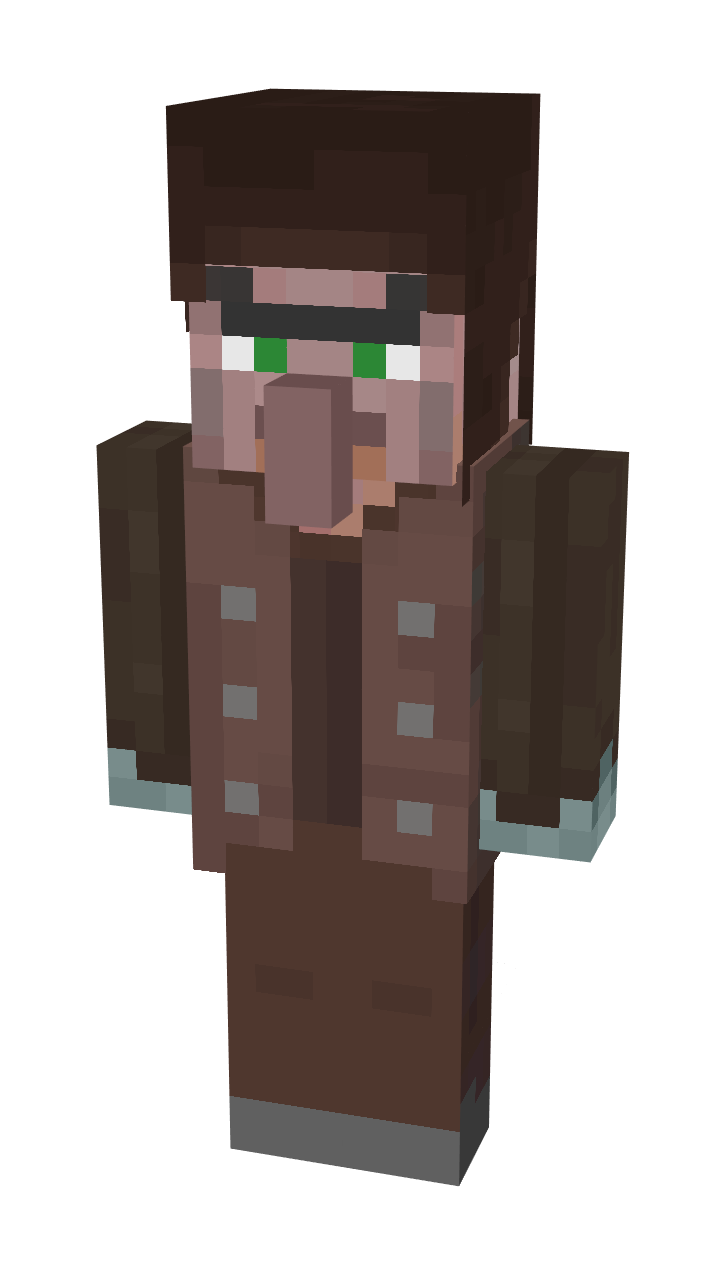
Congratulations, the Keeper is created and ready for use! In fact, we didn't even have to use the engine itself, the entity is described purely using in-game content. Be sure to try out the possibilities of resource and behavior packs, they can repeatedly help you in the future. The finished file structure should now look like this, double-check if something is suddenly missing:
My Mod
├─ behavior_packs
│  └─ mymod
│     ├─ entities
│     │  └─ keeper.json
│     └─ trading
│        └─ keeper_trades.json
└─ resource_packs
   └─ mymod
      ├─ entity
      │  └─ keeper.entity.json
      ├─ textures
      │  └─ entities
      │     └─ keeper.png
      ├─ render_controllers
      │  └─ keeper.render_controllers.json
      └─ animation_controllers
         └─ keeper.animation_controllers.json
But since this documentation is ultimately based on Inner Core technologies, subsequent steps for both describing entities and generally using resource and behavior packs will be described in the official documentation and the API reference (may not open without a VPN). Minecraft is not limited to our engine alone, there are still a lot of interesting technologies for content here; remember also that besides mobs we have unlimited possibilities of the launcher.
It is stored using named binary tags, we already used them in the previous article. Interacting with them does not differ from normal, and NBT is stored in the same way. This applies to any entities, including newly created ones, projectiles like arrows and many, many others!